- Reference
Eight minutes on npm: replaying the chalk/debug attack
- Abstract
How the chalk/debug compromise spread through npm dependencies, why a clean lockfile can leave questions unanswered, and how I built Fallout to trace exposure and prepare fixes.
- Date filed
- 17 October 2026
- Category
- Supply Chain Security
- Reading time
- 15 min
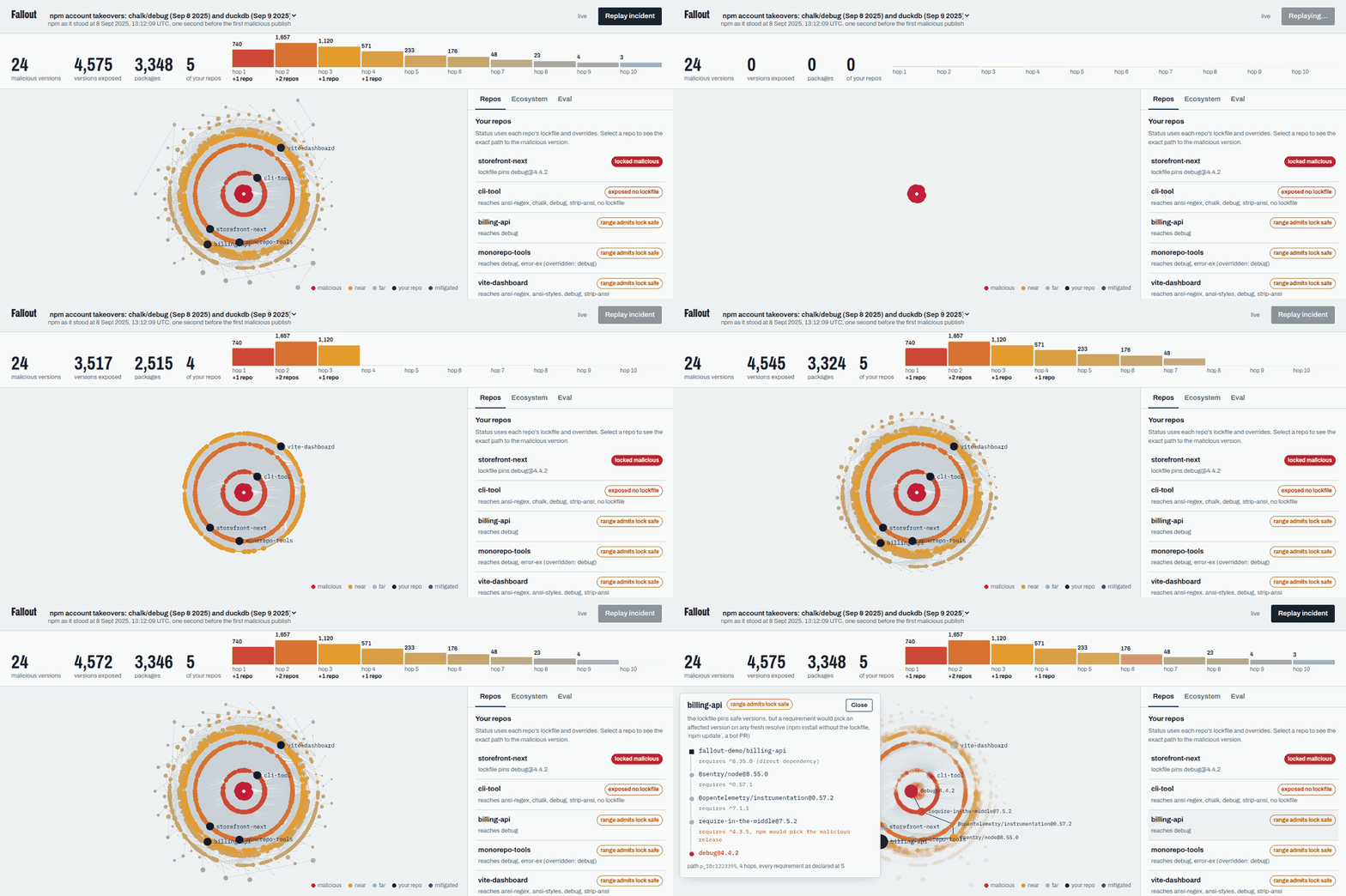
At 13:12:10 UTC on 8 September 2025, an attacker published a new version of ansi-styles, a small npm package used to add colour codes to terminal text. Over the next eight minutes, the same account published releases of debug, chalk, supports-color, strip-ansi and 14 more packages. Together, these packages are downloaded billions of times a week.
All of those releases contained hidden code that intercepted browser wallet APIs and replaced cryptocurrency addresses with the attacker's. The attacker had gained access after a maintainer followed a convincing email to a fake npm login page and entered their credentials.
npm removed the releases within hours. Until then, they were the official latest versions of some of the most widely used libraries in JavaScript. An install or upgrade that resolved an affected dependency range during that window could pick up the malware without any change to the application's own code.
Once the attack became public, teams had to work out whether those releases had reached them. Finding the package in a lockfile was one answer. Working out whether a build or upgrade could have selected it during the attack was harder.
I built Fallout for the FalkorDB Graph Hacks hackathon to investigate that second question. It reconstructs a dependency graph from just before the attack, replays the malicious releases against it, and traces exposure back to individual repositories. It can also prepare a fix and, after approval, verify the new lockfile and open a pull request.
To explain how the replay works, it helps to start with what npm does during an install.
What npm installs for you
Most web applications depend on libraries written and maintained by other people. In JavaScript, these libraries are distributed as packages, usually through npm, a public registry containing more than three million of them.
You declare the packages your application needs in package.json:
{
  "dependencies": {
    "express": "^4.18.0",
    "debug": "^4.3.4"
  }
}
That short list is only the beginning. Express has about 30 dependencies of its own, and those packages can have further dependencies. These are transitive dependencies. An application that lists 20 or 30 packages directly can end up installing hundreds, sometimes more than a thousand. Much of what ends up in node_modules was chosen several levels below your application.
The version strings also leave npm a choice. ^4.3.4 is a semver range that allows version 4.3.4 and newer 4.x releases. When npm resolves that requirement, a new compatible release can be selected without anyone editing package.json. This is how routine bug fixes reach downstream applications.
A lockfile, package-lock.json, records the exact versions selected throughout the tree so other machines can reproduce the install. As long as those locked choices are reused, a newly published version does not automatically replace them.
But projects also resolve dependencies again. Someone runs npm update; Dependabot or Renovate prepares an upgrade; a CI job runs without a committed lockfile. Some projects never commit one in the first place. At those points, the allowed ranges determine what npm can select.
This network of packages and maintainers is part of your software supply chain. A change far down the tree can reach your application through a dependency you never chose directly.
How an attacker gets into that chain
A supply chain attack targets something your application already trusts. In the chalk/debug incident, the attacker took over a maintainer account and used its existing publish rights. The ua-parser-js compromise in 2021 also involved account takeover.
Other incidents have started with a transfer of trust. In the 2018 event-stream attack, a maintainer gave access to someone who appeared willing to help maintain the project. That access was later used to introduce malware.
The Shai-Hulud worm, which appeared in September 2025 after chalk/debug, spread further by stealing npm tokens from developer machines and using them to publish infected versions of more packages.
A widely used dependency gives an attacker access to many downstream projects through their normal development workflows. If a malicious release becomes the version selected by an allowed range, a routine dependency resolution can bring it in. The application's manifest may be unchanged, and the affected package may sit several layers below anything the team recognises.
Reviewing your own code and signing your commits does not, by itself, verify every third-party release that an install brings in. The speed matters too: the chalk/debug batch covered 19 packages in eight minutes, while developer installs, CI jobs and upgrade bots continued running.
Why a clean lockfile leaves a question unanswered
During an incident, a team needs to establish its exposure and identify the dependency responsible before it can choose a fix.
A tool such as npm audit examines the lockfile it is given. A vulnerability scanner can identify a known affected version. A scan of the current lockfile cannot, by itself, reconstruct what a dependency resolution would have selected earlier.
Consider a project whose lockfile records the safe debug@4.4.1. Four levels down, a dependency declares debug ^4.3.5. The existing lockfile describes a clean install. During the attack window, resolving that requirement again would select the malicious debug@4.4.2.
The distinction matters when investigating an upgrade PR or a CI run that did not use the lockfile you have now. You need to recover the choices available at the time and follow them through the dependency tree.
Building the replay
Representing packages and their dependencies
A graph stores things and the connections between them. The things are called nodes; the connections are edges. On a subway map, stations are nodes and tracks are edges. In Fallout, each package version is a node, and a dependency is a directed edge.
For example, express@4.21.2 depending on debug@2.6.9 creates an edge from the Express version to the Debug version. Finding exposure means looking for a path from a repository through its dependencies to an affected version.
A relational database could store the same information. I used FalkorDB because following connections is the main operation in this project. Its query language, Cypher, lets you describe the path you want:
MATCH (dependent:Version)-[:DEPENDS_ON]->(bad:Version {is_malicious: true})
RETURN dependent.key
This query finds versions with a dependency edge pointing directly to a malicious version. Tracing further backwards finds the packages that depend on those versions, and eventually the repositories that use them.
Choosing a point in time
The baseline snapshot is anchored to one instant, which I call S:
2025-09-08T13:12:09.343Z
That timestamp comes from npm's registry records. It is exactly one second before the first malicious publish.
A range such as ^4.3.4 can resolve differently as new releases appear. To reconstruct the baseline, Fallout uses npm's own version picker, npm-pick-manifest, with before: S. The debug ^4.3.4 requirement therefore resolves to debug@4.4.1, as it did immediately before the attack.
The crawl starts with the 17,338 packages in npm-high-impact, selected for their download counts and number of dependents, and follows their transitive dependencies. The resulting graph contains 21,010 packages, 34,018 package versions and 114,810 resolved dependency edges. Each dependency edge retains the range declared by its parent.
Maintainers, advisories and six demo repositories bring the complete graph to approximately 67,000 nodes and 360,000 edges.
The malicious versions did not exist at S. Fallout adds them separately from OSV, the public advisory database, with their actual publish times. That separates the clean baseline from the releases introduced during the replay.
Deciding which edges are exposed
It is tempting to mark a requirement as exposed whenever its range allows any affected version. That produces misleading results for older vulnerabilities.
For example, lodash ^4.0.0 allows the affected 4.17.20, but a fresh resolution in the snapshot selects 4.17.21. The older version being inside the range does not mean npm would choose it.
Fallout checks the resolver's selection instead: a requirement is exposed when npm would pick an affected version. For malware, it resolves the range again with malicious releases added at their publish times.
In the chalk/debug replay, every malicious release was the newest version, so range overlap and resolver selection happen to agree. The replay flags 790 dependency edges.
Following exposure back to its dependents
From the 24 malicious versions, Fallout follows incoming dependency edges one hop at a time. The first hop contains direct dependents. The second contains their dependents, and so on. This is a breadth-first search run backwards along the dependency edges.
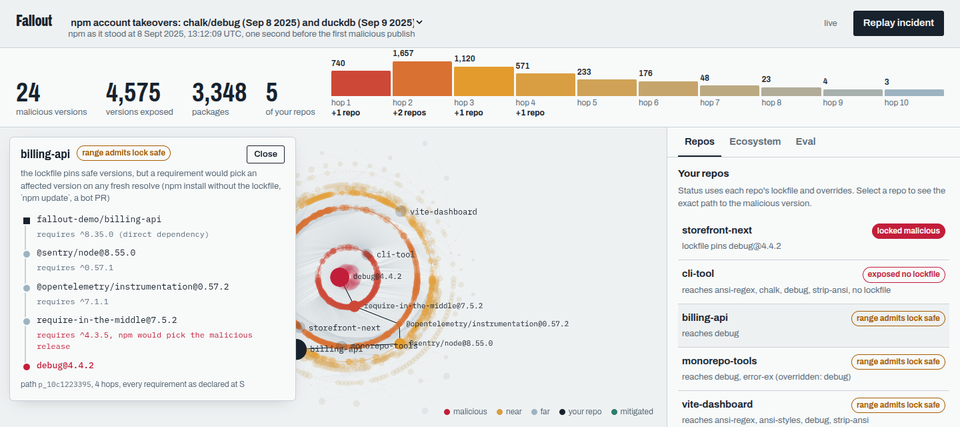
Within ten hops, it reaches 4,575 versions across 3,348 packages, roughly 13.5% of the versions in the high-impact dependency tree. There are 740 versions in the first hop. The second is the largest ring, with 1,657, and the rings shrink after that. The full traversal takes about 0.4 seconds.
I kept the traversal separate from path enumeration. Asking for every possible path up to ten hops can produce a huge result when many packages share dependencies. Two branches can meet at the same package, split again, and generate many paths through a relatively small set of nodes.
Fallout runs one query per hop and records when it first reaches a node and which node led to it. Those stored predecessors let the console reconstruct an exposure path without another search. They also drive the animation of the attack spreading ring by ring.
Reading the result for a repository
A path to an affected package does not tell you whether the repository has already locked that version or could select it during a new resolution. Fallout reads package.json, the lockfile and any overrides to distinguish those cases. An override is an npm rule for controlling a dependency's version.
The statuses below describe the incident being replayed:
| Status | Meaning |
|---|---|
LOCKED_MALICIOUS | The lockfile records an affected version. This is the first remediation priority. |
EXPOSED_NO_LOCKFILE | There is no lockfile, and a fresh resolve during the attack window would select an affected version. |
RANGE_ADMITS_LOCK_SAFE | The lockfile is clean, but resolving an exposed requirement again during the attack window would select an affected version. |
MITIGATED_BY_OVERRIDE | An override blocks the identified exposure, and the repository recheck confirms it. |
NOT_AFFECTED | No path to the incident's affected versions was found within the graph's coverage. |
I was particularly interested in the clean-lockfile case. It captures exposure that a scan of the recorded versions alone cannot show.
Five of the six demo repositories are exposed:
| Repository | Status | Dependency evidence |
|---|---|---|
storefront-next | LOCKED_MALICIOUS | The lockfile records debug@4.4.2. |
cli-tool | EXPOSED_NO_LOCKFILE | chalk ^5.3.0 and debug ^4.3.4 would select the malicious releases during the attack window. |
billing-api | RANGE_ADMITS_LOCK_SAFE | Four hops down, @sentry/node → @opentelemetry/instrumentation → require-in-the-middle leads to a debug ^4.3.5 requirement that selects debug@4.4.2. |
monorepo-tools | RANGE_ADMITS_LOCK_SAFE | An override covers debug under eslint, but an exposed path through cosmiconfig → parse-json → error-ex remains outside its scope. |
vite-dashboard | RANGE_ADMITS_LOCK_SAFE | The lockfile is clean, but a fresh resolve of exposed requirements would select malicious releases. |
notify-worker | NOT_AFFECTED | No dependency path reaches the affected versions. |
The storefront-next lockfile is a hand-edited fixture. npm removed the original malicious tarball, so this example represents a compromised lockfile without downloading the malware.
In billing-api, Debug arrives through an error-monitoring SDK. It is not a direct dependency the application chose. The monorepo-tools example shows a different problem: adding an override for one affected branch can leave another branch exposed.
Fallout returns the version range on every hop, so each verdict comes with a specific route through the tree.
What the agent does
The console has a chat panel where you can ask, for example, “Are any of our repos affected by the chalk/debug incident, and how do we fix billing-api?”
The agent answers by calling graph tools exposed through MCP, the Model Context Protocol. MCP gives the model a defined set of functions it can use:
| Tool | Purpose |
|---|---|
blast_radius | Find the versions and packages an incident can reach. |
exposure_path | Trace exposure to a particular repository or package. |
repo_status | Classify a repository using its lockfile and overrides. |
critical_packages | Find packages that are central to the dependency graph. |
maintainer_reach | Measure the packages reachable through one account's maintained packages. |
plan_fix | Prepare changes to remove the identified exposure. |
ingest_advisory | Add advisory data to the investigation. |
request_fix_approval | Submit a proposed fix for human approval. |
recheck_repo | Check the repository again after a change. |
Tool results include the paths found, the Cypher query and the execution time. The agent is required to cite a path ID for each claim.
Its role is to work out which calls answer the question, then explain their results. A repository investigation might start with the blast radius, narrow to an exposure path, check the lockfile status and produce a fix plan. The evidence comes from those calls.
Getting the fix right
For debug, a global override looks like an easy fix:
{ "overrides": { "debug": "4.4.1" } }But that forces every Debug requirement in the tree to use 4.4.1, including the debug ^3.2.7 requirement from eslint-plugin-import. An incident fix would also introduce a major-version change into an unrelated branch.
Fallout uses a version-specific override instead:
{ "overrides": { "debug@4.4.2": "4.4.1" } }Arborist matches this rule against dependency edges whose declared ranges intersect 4.4.2. In this replay, that targets the edges that would select the malicious release while leaving the unrelated 3.x requirement alone.
The replacement is the highest safe version published before S. If the affected package is a direct dependency, Fallout pins it in package.json instead, because npm rejects an override that conflicts with a root dependency's specification.
Approval and execution
The agent can prepare a fix and request approval. It has no tool that can write to GitHub, and a test checks that boundary.
When a person clicks Approve, the API issues a single-use token that expires after ten minutes and passes it directly to the executor. The model never receives it.
The executor checks that the repository is on an allowlist, then regenerates its lockfile in an ephemeral container with no secrets. Installation uses --package-lock-only --before=S --ignore-scripts. Before opening a PR, the executor checks that no affected version remains in the resulting lockfile.
I ran into a problem the first time I regenerated the lockfile. I added the override to storefront-next and ran npm install --package-lock-only, but the hoisted debug@4.4.2 entry stayed in the lockfile. npm had retained an already-locked node that still satisfied an edge.
The sandbox now removes lockfile entries at affected versions before regenerating the file. A PR is created only after the check for affected versions passes.
The PR description contains the advisory, graph paths, the reason for the changes and the verification output. The executor records the action in the graph and rechecks the branch.
In the demo, approving the fixes opened real pull requests and moved the rechecked repositories to MITIGATED_BY_OVERRIDE: billing-api#1, cli-tool#1 and storefront-next#1.
Checking the results against npm
I evaluated Fallout on 300 questions about whether a target was exposed to an advisory group and which path explained the result, using S as the reference point. The questions cover 506 targets and 13 advisory groups, including chalk/debug, duckdb, part of Shai-Hulud, the event-stream and ua-parser-js incidents, and seven high-severity vulnerabilities.
The expected answers come from an independent oracle built on @npmcli/arborist, npm's installer library. It builds each target's ideal dependency tree as of S and never reads Fallout's graph.
Four systems answered the same questions. The three systems that use a model all used gpt-6-luna:
| System | Precision | Recall | F1 | Invented package versions | p95 latency |
|---|---|---|---|---|---|
| A. Model alone | 0.973 | 0.493 | 0.655 | 10.9% | 17.5 s |
| B. Model with the full lockfile in its prompt | 0.985 | 0.890 | 0.935 | 0.0% | 7.6 s |
| C. Fallout agent with graph tools | 1.000 | 1.000 | 1.000 | 0.0% | 4.5 s |
| G. Graph tools without a model | 1.000 | 1.000 | 1.000 | 0.0% | 24 ms |
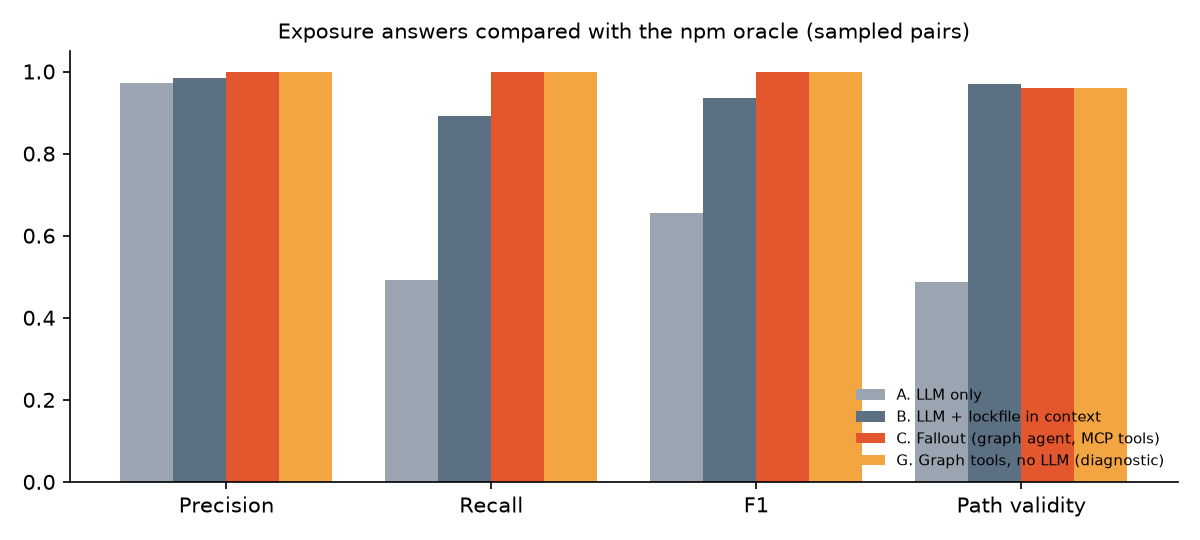
On this evaluation, the model alone missed about half the exposed targets, and 10.9% of the versions it cited did not exist. Supplying the full lockfile raised recall to 89%, which makes it a useful baseline, though it still missed some exposure associated with a new resolution.
Both Fallout configurations returned the correct exposure verdict for every target, with no false positives or invented versions. The agent introduced no additional verdict errors in this test. Its cost per question was about the same as the lockfile baseline, a fraction of a cent, with lower p95 latency.
The paths were less accurate than the verdicts. About 4% named a version that npm would not actually have installed. Every one of those errors occurred at a peer dependency, where the version selected depends on the surrounding tree.
npm can satisfy a peer using a version already present. Fallout resolves each range independently, so it sometimes names a different version at that hop. The exposure verdict remained correct in those cases, but I count the path as wrong.
The sample also had fewer positives than I intended. Only 73 of the 300 questions were positive, and 68 of those came from chalk/debug. By September 2025, most popular packages had moved past the versions affected by the older advisories. Those groups therefore contributed mostly negative cases.
All prompts and answers are included in the repository.
What maintainer accounts can reach
The same graph can measure how much depends on the packages controlled by a single account.
Fallout runs PageRank and betweenness centrality in FalkorDB. PageRank gives more weight to packages depended on by other highly ranked packages. Betweenness measures how often a package lies on shortest paths between others.
For the account analysis, I selected the 300 accounts with the highest total PageRank across the packages they maintain, then found every package that transitively depends on one of those packages.
This analysis combines the historical dependency graph with today's maintainer lists. The results cover the 21,010 packages in the high-impact tree.
The account with the largest measured reach covers 38% of that tree. Each of 33 accounts reaches more than a quarter. A greedy selection of three accounts covers half the tree; ten cover 63%.
Of the 100 packages with the highest PageRank, 42 have a single maintainer. Of those, 41 publish without npm provenance, a cryptographic record of where a release was built.
Many of these maintainers look after foundational software without pay. The figures describe how much depends on the security of a relatively small set of accounts.
Zimmermann et al. found a similar concentration in Small World with High Risks at USENIX Security 2019. This analysis does not repeat their exact method, so the percentages are not directly comparable. It does show the same broad pattern in a graph anchored to the period of the chalk/debug attack: compromising one account can affect packages with a large downstream reach.
Simulating another incident
The console's Simulate an attack mode sends hypothetical incidents through the same analysis pipeline.
You can model a malicious patch release, mark a range of existing versions as compromised, or supply OSV IDs for a real advisory. Templates include the account with the widest measured reach and the package with the highest PageRank.
A simulation takes about a second. The console animates the traversal and produces a response plan with an overrides block covering the repositories, plus individual fixes ordered by priority.
Those plans use the same approval and PR workflow. For a hypothetical release, this lets a team prepare a rule blocking the specific simulated version before it is published. The analysis remains bounded by the dependency data in the graph.
Limits of the replay
Fallout does not reproduce all of npm's tree-building behaviour. It does not model deduplication or hoisting, and its independent peer resolution accounts for the incorrect paths in the evaluation.
Historical metadata also has gaps. The latest tag at S is approximated as the highest stable, non-deprecated version published by then, while deprecation flags come from today's registry.
Git, tarball, file: and bundled dependencies are outside the crawl. The graph covers the 17,338 high-impact starting packages and their followed dependencies, rather than the entire npm registry.
The compromised storefront-next lockfile is a synthetic fixture, as described above. It tests how Fallout handles a lockfile containing an affected version, without retrieving the original tarball.
Data, permissions and running the project
Fallout uses public metadata from npm, deps.dev and OSV. Malicious releases exist only as metadata in the graph; the project never downloads or executes their code. The sandbox uses --package-lock-only --ignore-scripts.
PR creation is limited to repositories in my demo organisation, with the allowlist enforced in two places. Maintainer records contain usernames, never email addresses.
The repository includes the code, data pipeline, Cypher queries and full evaluation, along with a list of deviations from the original build spec. You can start the project from a 13 MB snapshot with docker compose up, or try the live console.
Fallout was built for Graph Hacks (FalkorDB) in October 2026, in the “Agents That Act on Connected Data” track. AI coding assistants helped write the code and documentation. I checked the design decisions, evaluation and claims in this post against the repository.